


- Posts: 26
- Thank you received: 1
ITVDesk 7.7v Livestream Pusher as an RTSP Server
2 years 7 months ago - 2 years 7 months ago #11
by admin
ITVDesk 7.7v Livestream Pusher as an RTSP Server was created by admin
ITVDesk Livestream Pusher as an RTSP Server
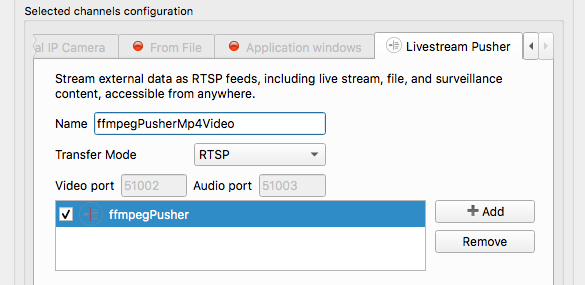
ITVDesk software enables setting up your own RTSP server on your computer, meaning it can receive and distribute live video streams within your network or over the internet. When using ITVDesk as an RTSP server, you can configure one or more channels (streams) to receive video content from external sources via the LiveStream Pusher media source.
Sending Video Streams to ITVDesk Using FFMpeg
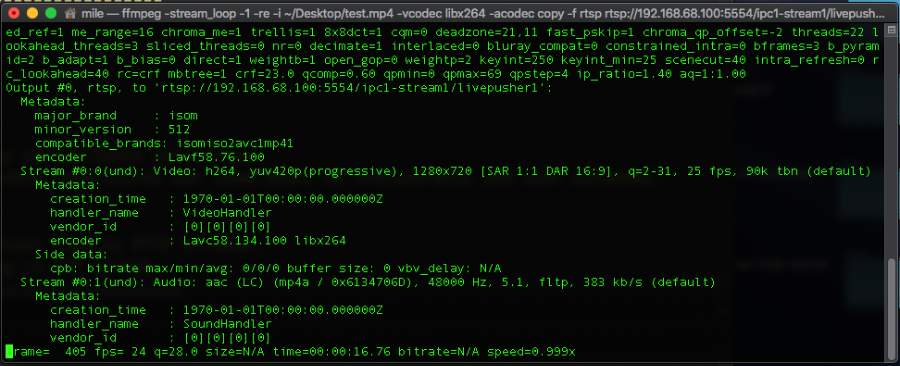
To send a video stream to the ITVDesk RTSP server using FFMpeg, you need to use the FFMpeg command and RTSP Transfer mode with appropriate parameters that specify the video content source, codec, and the RTSP URL where ITVDesk is listening. Here's an example of how this can be achieved:
G5:~ itvd$ ffmpeg -stream_loop -1 -re -i /Users/mile/Desktop/test.mp4 -vcodec libx264 -acodec copy -f rtsp rtsp://192.168.68.100:5554/ipc1-stream1/livepusher1
This command will continuously send video content from thefile to the ITVDesk RTSP server atusing TCP as the transport protocol. The command parameters are:
For streaming video and audio content to ITVDesk livestream pusher rtsp servers, besides FFMpeg, there are several other tools and software solutions that can be utilized. Each of these tools offers unique features and may be better suited for specific use cases. Here are some popular alternatives to FFMpeg that you might consider:
UDP/TCP mode Features of an ITVDesk RTSP Pusher:
These resources provide a solid foundation for understanding and leveraging RTSP pusher technology in your applications, enabling you to deliver robust and flexible streaming solutions.
ITVDesk software enables setting up your own RTSP server on your computer, meaning it can receive and distribute live video streams within your network or over the internet. When using ITVDesk as an RTSP server, you can configure one or more channels (streams) to receive video content from external sources via the LiveStream Pusher media source.
Sending Video Streams to ITVDesk Using FFMpeg
To send a video stream to the ITVDesk RTSP server using FFMpeg, you need to use the FFMpeg command and RTSP Transfer mode with appropriate parameters that specify the video content source, codec, and the RTSP URL where ITVDesk is listening. Here's an example of how this can be achieved:
G5:~ itvd$ ffmpeg -stream_loop -1 -re -i /Users/mile/Desktop/test.mp4 -vcodec libx264 -acodec copy -f rtsp rtsp://192.168.68.100:5554/ipc1-stream1/livepusher1
This command will continuously send video content from the
test.mp4rtsp://192.168.68.100:5554/ipc1-stream1/livepusher1- : Repeats the video for continuous loop streaming.
-stream_loop -1
- : Limits the input file read speed to real playback speed.
-re
- : Specifies the input file to be streamed.
-i test.mp4
- : Uses the H.264 video codec for video content compression.
-vcodec libx264
- : Copies the original audio stream without alteration.
-acodec copy
- : Specifies the use of TCP as the transport protocol for RTSP. You can use UDP to.
-rtsp_transport tcp
- : Sets the output format to RTSP.
-f rtsp
- : The target RTSP URL on the ITVDesk server.
rtsp://192.168.68.100:5554/ipc1-stream1/livepusher1
- Surveillance Cameras: Sending streams from IP cameras or other sources to the ITVDesk server for recording or further distribution.
- Education and Webinars: Streaming educational materials or live webinars.
- Live Events: Streaming concerts, sports events, and other live events.
- Media Content Distribution: Distributing movies, TV shows, or other video content within an organization or over the internet.
- Remote Monitoring: For industrial, agricultural, or environmental monitoring, where live video feeds are crucial for operations.
- Healthcare: Streaming medical procedures or patient monitoring for remote consultation and diagnosis.
- Video Blogging and Social Media: Creators can use it to live stream to their audience across different platforms.
- Corporate Communications: For internal meetings, training sessions, or announcements, providing a secure and private channel for video distribution.
- Customer Service and Support: Live product demonstrations or support sessions, enhancing customer engagement and experience.
For streaming video and audio content to ITVDesk livestream pusher rtsp servers, besides FFMpeg, there are several other tools and software solutions that can be utilized. Each of these tools offers unique features and may be better suited for specific use cases. Here are some popular alternatives to FFMpeg that you might consider:
- GStreamer: A powerful media processing tool that enables recording, processing, and playback of media data. GStreamer is highly modular and customizable, supporting a wide range of media formats and protocols, including RTSP.
- VLC Media Player: While best known as a media player, VLC can also function as a streaming server and client. VLC supports broadcasting streams over the network using various protocols, including RTSP.
- Open Broadcaster Software (OBS) Studio: OBS Studio is a popular choice for live streaming and video recording. Primarily used for streaming to platforms like Twitch and YouTube, OBS can also stream to RTSP and other servers using custom settings.
- Live555 Streaming Media: Live555 is a set of libraries for streaming, playing, and recording media data over networks. Supporting numerous protocols, including RTSP, Live555 is often used in academic and research projects.
UDP/TCP mode Features of an ITVDesk RTSP Pusher:
- Support for Multiple Protocols: The RTSP pusher supports streaming over TCP, UDP, and RTSP modes. This flexibility allows for the optimization of streaming performance and reliability based on network conditions and application requirements.
- RTP Packaging: Both audio and video data are packaged into RTP (Real-time Transport Protocol) packets for streaming. RTP provides end-to-end network transport functions suitable for applications transmitting real-time data, such as audio, video, or simulation data, over multicast or unicast network services.
- TCP Mode Specifics: When operating in TCP mode, an additional 4 bytes are prepended to the RTP header. This header includes:
- A "magic" byte with the value 0x24, indicating the start of the RTP packet.
- A channel identifier, typically set to 0, used to multiplex different streams or sessions over the same TCP connection.
- The length of the RTP payload, including the RTP header, specified in the remaining 16 bits.
These resources provide a solid foundation for understanding and leveraging RTSP pusher technology in your applications, enabling you to deliver robust and flexible streaming solutions.
Attachments:
Last edit: 2 years 7 months ago by admin.
Please Log in or Create an account to join the conversation.
- DanielRaknul
- Offline
- New Member
-

Less
More
- Posts: 1
- Thank you received: 1
8 months 2 weeks ago - 8 months 2 weeks ago #24
by DanielRaknul
Replied by DanielRaknul on topic ITVDesk 7.7v Livestream Pusher as an RTSP Server
ITVDesk 7.7v La piattaforma vanta un’ampia selezione di giochi, dalle slot machine più moderne ai giochi da tavolo tradizionali, passando per l’esperienza immersiva del casinò con croupier dal vivo. L’interfaccia è progettata per essere user-friendly, con tempi di caricamento veloci e un servizio di assistenza clienti reattivo. I bonus e le promozioni disponibili rappresentano un valore aggiunto per i giocatori. Per saperne di più su questa piattaforma, visitate
instantcasinosit.it
tempi, potenziale limite potrebbe risiedere nella varietà dei metodi di pagamento accettati. In definitiva, Instant Casino si configura come una scelta solida e affidabile per chi cerca un’esperienza di casinò online di qualità.
Last edit: 8 months 2 weeks ago by DanielRaknul.
The following user(s) said Thank You: admin
Please Log in or Create an account to join the conversation.
8 months 2 weeks ago - 8 months 2 weeks ago #25
by admin
Replied by admin on topic ITVDesk 7.7v Livestream Pusher as an RTSP Server
Hi Daniel,
thanks a lot for sharing your experience ?
Happy to hear that ITVDesk is working well for your setup.If you need any help, examples, or have ideas for improvements, just let us know.Best regards,
Note:
1. TCP mode is recommended for WAN and unstable networks, while UDP provides lower latency in local LAN environments. ITVDesk supports both, so users can choose what best fits their setup.
2. For long-running streams we recommend forcing keyframes and disabling B-frames for maximum compatibility with NVR/VMS systems:
-x264-params keyint=50:min-keyint=50:no-scenecut -bf 0
This helps ensure fast stream recovery and smoother reconnects if the network drops.
Good to know other users:
One pushed RTSP stream can be consumed by multiple clients (VMS, players, recorders) simultaneously, without re-encoding on the source side.
ITVDesk
thanks a lot for sharing your experience ?
Happy to hear that ITVDesk is working well for your setup.If you need any help, examples, or have ideas for improvements, just let us know.Best regards,
Note:
1. TCP mode is recommended for WAN and unstable networks, while UDP provides lower latency in local LAN environments. ITVDesk supports both, so users can choose what best fits their setup.
2. For long-running streams we recommend forcing keyframes and disabling B-frames for maximum compatibility with NVR/VMS systems:
-x264-params keyint=50:min-keyint=50:no-scenecut -bf 0
This helps ensure fast stream recovery and smoother reconnects if the network drops.
Good to know other users:
One pushed RTSP stream can be consumed by multiple clients (VMS, players, recorders) simultaneously, without re-encoding on the source side.
ITVDesk
Last edit: 8 months 2 weeks ago by admin.
Please Log in or Create an account to join the conversation.