1 item for 56,00 €

Remote Communication & Intervention

Remote Communication & Intervention

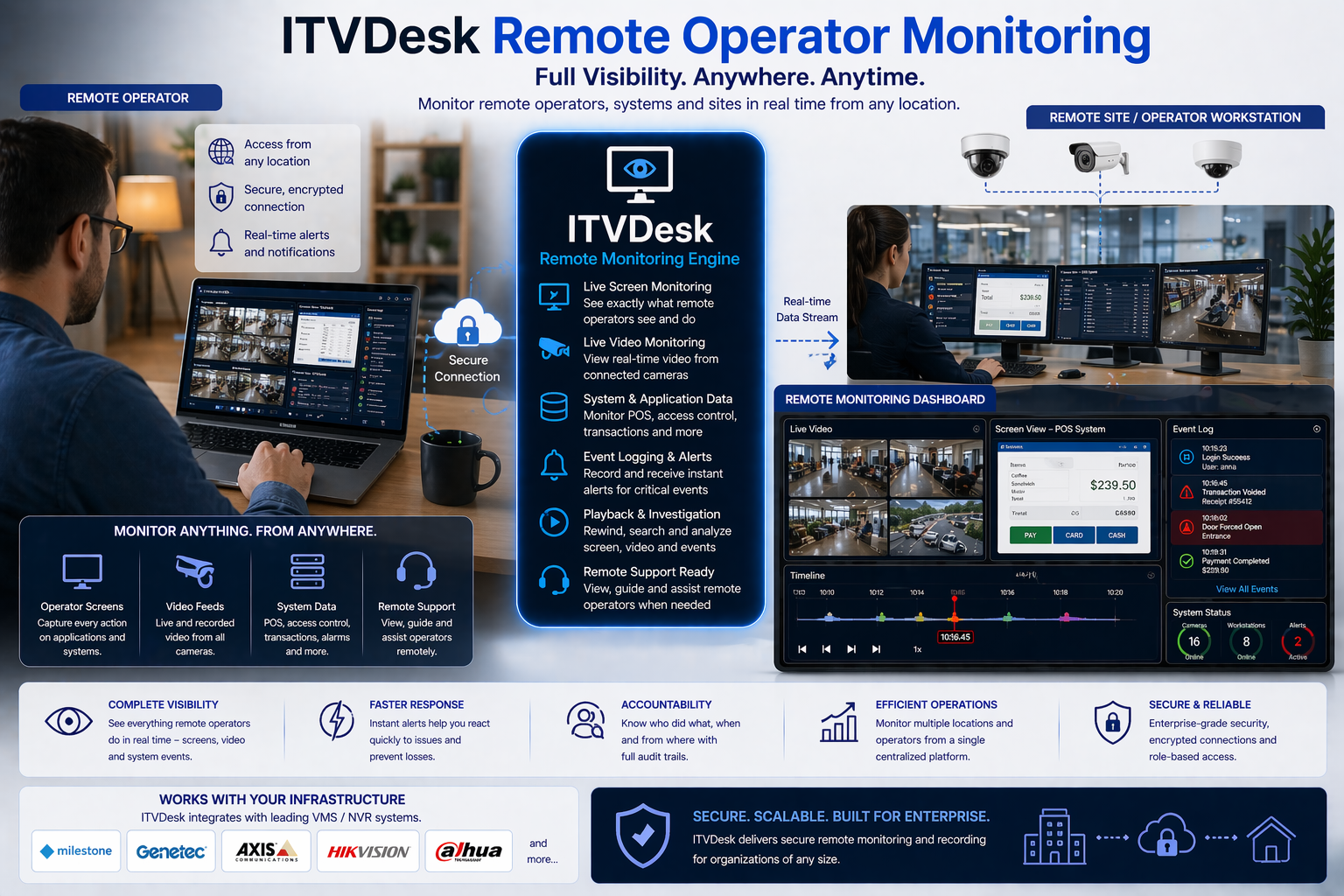
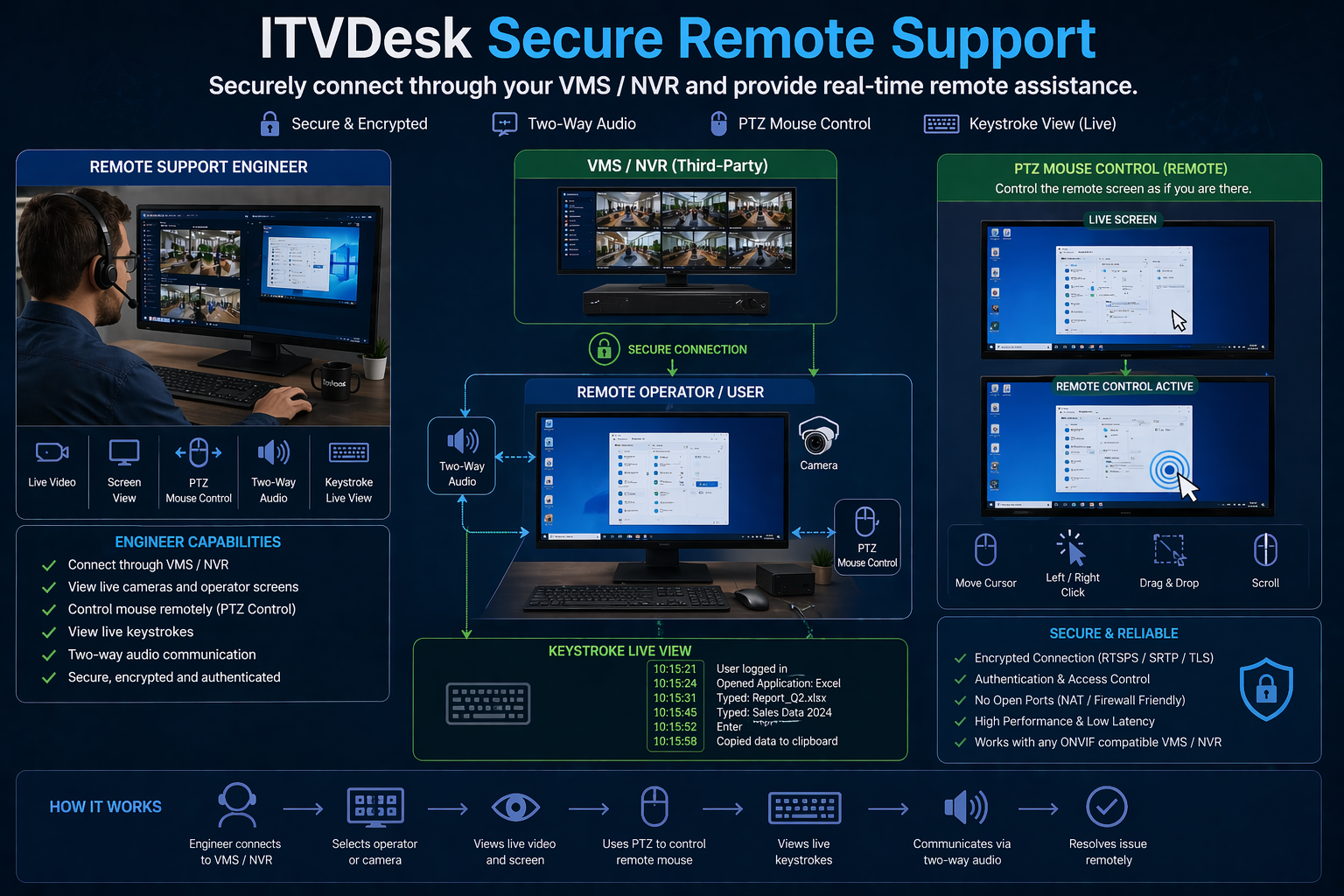
ITVDesk extends traditional video surveillance by enabling real-time two-way audio communication between the VMS operator and the user behind the monitored computer. This allows security teams, operators, supervisors, and support personnel not only to observe events, but also to interact instantly through the surveillance system.

Using ONVIF-compatible audio streaming and callback mechanisms, ITVDesk can expose the monitored computer as an interactive endpoint inside the VMS environment. This makes it possible to combine video monitoring, live audio communication, alarm events, and operator control into a single unified workflow.

How It Works

ITVDesk presents the monitored computer to the VMS as a standard ONVIF-compatible device, including support for video, audio, and event communication. Once connected, the operator can access the endpoint through the VMS in the same way as any other surveillance device, but with the added ability to communicate directly with the user on that computer.

Through two-way audio support, the operator can send voice instructions, warnings, or assistance to the remote location, while also receiving audio feedback from the monitored environment. With callback-based event handling, communication can also be triggered during specific incidents such as alarms, suspicious activity, operator intervention, or workflow exceptions.

Key Benefits

  • Real-time two-way audio communication between VMS operator and monitored endpoint
  • Faster incident response through direct verbal interaction
  • No separate intercom or VoIP system required
  • Unified surveillance workflow with video, audio, events, and control in one platform
  • Seamless ONVIF integration with compatible VMS environments
  • Remote warning, instruction, and assistance capabilities
  • Better protection of users, assets, and sensitive workflows

Practical Use Cases

Security Operations

Security personnel can immediately speak to a user or person at the monitored endpoint during suspicious behavior, policy violations, or restricted activity. This turns surveillance into an active prevention tool instead of a passive recorder.

Remote Assistance

Operators or support teams can guide the remote user directly through the VMS platform, which is especially useful in controlled environments where external communication tools are restricted or unavailable.

Banking and Secure Environments

In financial institutions and high-security facilities, direct voice communication allows rapid intervention, verification, and controlled operator-to-user interaction without introducing additional communication infrastructure.

POS and Retail

Supervisors can communicate with staff at remote sales points for assistance, transaction verification, customer flow management, or incident escalation.

Manufacturing and Industrial Control

In production and operational environments, supervisors can issue immediate instructions to remote stations, especially where speed, accuracy, and controlled workflows are critical.

Education and Managed Access Facilities

Authorized staff can communicate with users in classrooms, labs, libraries, or managed systems where monitoring and direct intervention are both important.

Why It Matters

Most surveillance platforms are designed only for observation. ITVDesk adds a new layer by making the monitored computer an interactive VMS endpoint. Instead of only watching an event, the operator can immediately respond, communicate, and influence the situation in real time.

This improves operational efficiency, shortens response time, and creates a more advanced surveillance model that combines monitoring, communication, and intervention in a single solution.

Why ITVDesk

ITVDesk is designed to go beyond standard screen-to-video conversion. By combining ONVIF video integration, two-way audio communication, event callback support, and remote operator interaction, ITVDesk enables advanced VMS use cases that are normally not available with conventional IP cameras or software encoders.

This makes ITVDesk an ideal solution for organizations that need not only visibility, but also direct communication and real-time intervention through their video surveillance infrastructure.

ITVDesk IPCam – POS Overlay API Manual

1. Overview

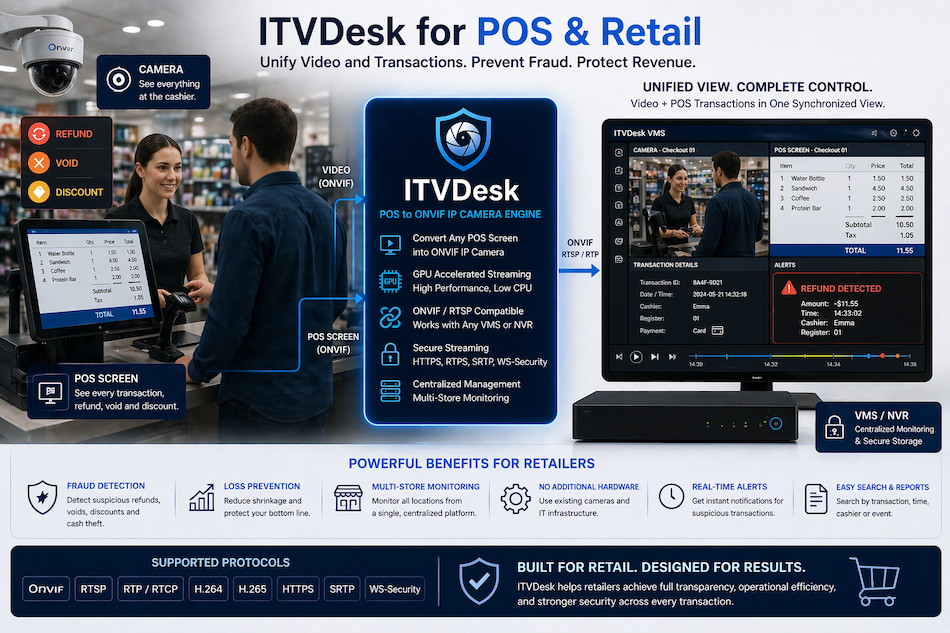
The POS Overlay API allows external systems (POS, ERP, scripts) to display receipt data directly on the screen and inside the video stream generated by ITVDesk IPCam.

This enables full POS-to-video synchronization, where each transaction is visually embedded into the recorded stream.

Typical workflow:

  • Open a receipt

  • Add item lines

  • Display total amount

  • Close the receipt (manually or automatically)

All displayed text is:

  • Shown live on screen

  • Embedded into the video recording

  • Time-synchronized with the stream


2. API Endpoint

POST http://<ITVDESK_IP>:7033/pos/push

ONVIF Protocol: HTTP
Method: POST
Content-Type: application/json


3. Required JSON Parameters

ParameterTypeDescription
uri string RTSP stream URI where text will be displayed
token string Authentication in username:password format
cmd string POS command (open, item, total, close)

4. Optional Parameters

ParameterTypeDescription
title string Cash desk / register name
billid string Receipt / transaction ID
text string Item or total text to display
ttl integer Time to live in milliseconds

Note:
ttl defines how long the overlay stays visible if close is not sent.


5. POS Commands (cmd)

5.1 open – Open Receipt Session

Initializes a new POS overlay session and opens the display window.

 
curl -i -X POST "http://192.168.68.82:7033/pos/push" \ -H "Content-Type: application/json" \ -d '{ "uri": "rtsp://192.168.68.82:5554/ipc1-stream1/screenlive", "token": "admin:admin", "cmd": "open", "title": "CASH DESK 1", "billid": "2026-01-14-0330123", "ttl": 5000 }'

Effect:

  • POS overlay window appears

  • Receipt session is started

  • TTL countdown begins


5.2 item – Add Receipt Item

Adds a new line to the active receipt.

curl -i -X POST "http://192.168.68.82:7033/pos/push" \ -H "Content-Type: application/json" \ -d '{ "uri": "rtsp://192.168.68.82:5554/ipc1-stream1/screenlive", "token": "admin:admin", "cmd": "item", "title": "CASH DESK 1", "billid": "2026-01-14-0330123", "text": "COFFEE 2.50", "ttl": 5000 }'

Notes:

  • Can be called multiple times

  • Each call adds a new line

  • TTL is refreshed


5.3 total – Display Total Amount

Displays the final total of the receipt.

curl -i -X POST "http://192.168.68.82:7033/pos/push" \ -H "Content-Type: application/json" \ -d '{ "uri": "rtsp://192.168.68.82:5554/ipc1-stream1/screenlive", "token": "admin:admin", "cmd": "total", "text": "TOTAL 6.40" }'

Effect:

  • Final total line is displayed

  • Overlay remains visible until closed or TTL expires


5.4 close – Close POS Overlay

Closes the POS overlay window immediately.

curl -i -X POST "http://192.168.68.82:7033/pos/push" \ -H "Content-Type: application/json" \ -d '{ "uri": "rtsp://192.168.68.82:5554/ipc1-stream1/screenlive", "token": "admin:admin", "cmd": "close" }'

Effect:

  • Overlay disappears instantly

  • Receipt session ends


6. Automatic Close (TTL)

If close is not sent:

  • The overlay will automatically close after ttl expires

  • TTL acts as a safety fallback

Example:

  • ttl: 5000 → overlay closes after 5 seconds of inactivity


7. Recommended Call Sequence

  1. open

  2. item (repeat as needed)

  3. total

  4. close (or wait for TTL)


8. Common Use Cases

  • POS + Video synchronization

  • Cash register monitoring

  • Transaction verification

  • Fraud prevention

  • Retail and hospitality surveillance


9. Integration Notes

  • API is HTTP stateless, but stateful per RTSP stream

  • One active POS session per stream

  • Supports multiple streams simultaneously

  • Overlay text is embedded into recorded video


10. ONVIF Replay – Search & Playback by Receipt (billId)

10.1 Overview

ITVDesk extends standard ONVIF Replay functionality by enabling video search and playback based on POS receipt number (billId).

Each POS transaction is visually displayed on screen, embedded into the recorded video stream, and indexed internally using the provided billId. This allows exact transaction-to-video correlation without manual time searching.


10.2 How It Works

  1. POS system sends billId using the existing /pos/push API
  2. ITVDesk associates the billId with:
    • RTSP stream URI
    • Recording token
    • Exact UTC timestamps (open / close)
  3. Transaction data is stored as searchable metadata
  4. Replay requests return an ONVIF-compatible replay stream

10.3 POS Recording Lifecycle

ActionEffect
open Receipt session is started and timestamped
item Receipt lines are appended as video metadata
close Receipt is finalized and indexed for replay
Recording Video contains POS overlay synchronized with the transaction

10.4 Search API – Find Recording by billId

Endpoint:

POST http://<ITVDESK_IP>:7000/pos/search

Request example:

{
  "uri":    "rtsp://192.168.68.76:554/ipc1-stream1/screenlive",
  "token":  "admin:admin",
  "billId": "2026-01-14-0330123"
}
ParameterTypeDescription
uri string RTSP stream associated with the POS transaction
token string Authentication in username:password format
billId string Receipt / transaction identifier

10.5 Search Response – Replay Information

Example response:

{
  "found": true,
  "billId": "2026-01-14-0330123",
  "utc": 1768601388,
  "recordingToken": "RecordingToken_16",
  "replayUrl": "rtsp://192.168.68.81:554/ipc1-stream1/screenlive/replay?earliest=1768601368&latest=1768601398"
}
FieldDescription
recordingToken ONVIF Recording token associated with the transaction
startTime Transaction start time (UTC)
endTime Transaction end time (UTC)
replayUri RTSP replay URI usable by ONVIF clients and media players

10.6 Usage Scenarios

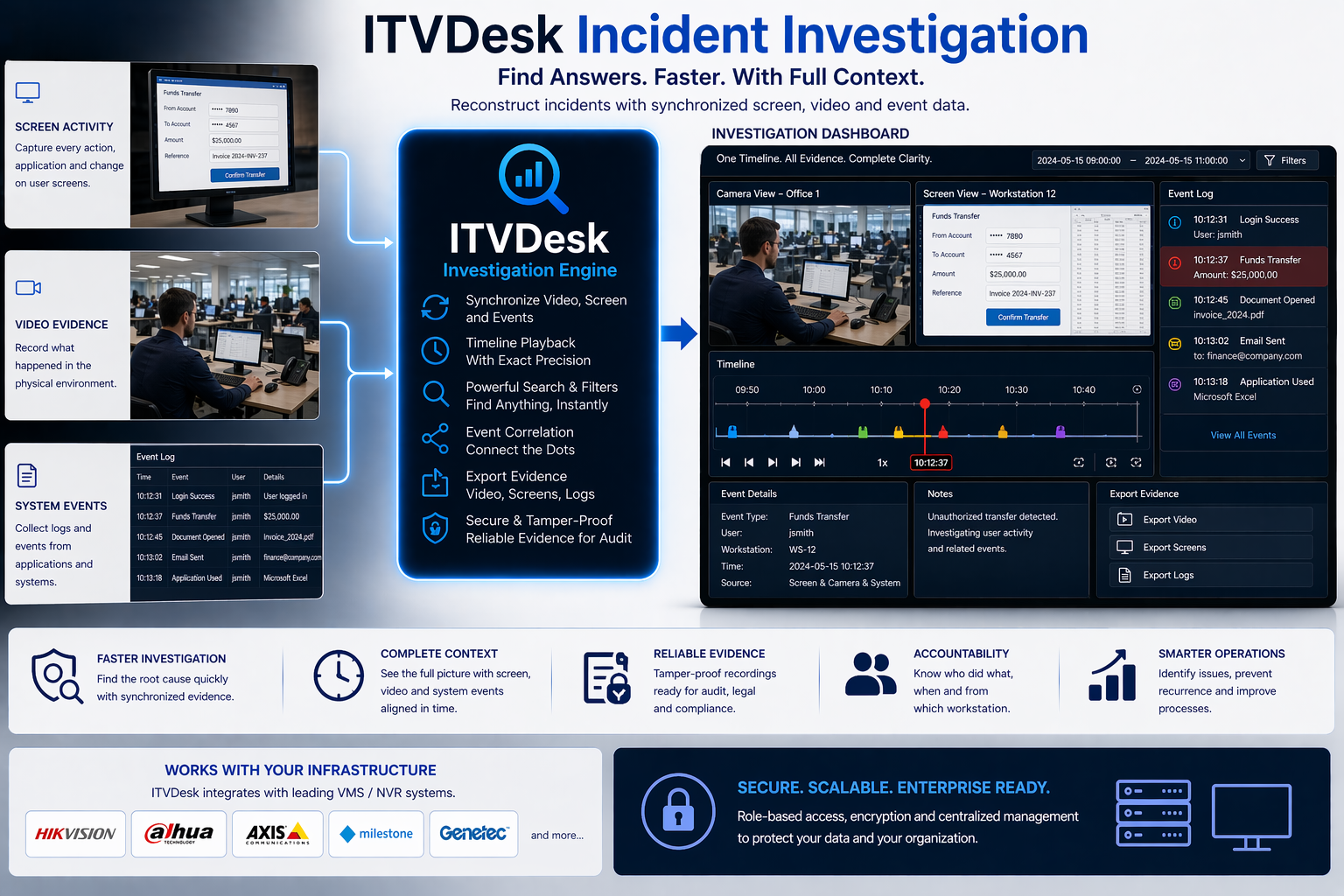
  • Instant video lookup by receipt number
  • Fraud investigation and transaction verification
  • POS-to-video audit trails
  • Retail and hospitality compliance review

10.7 Notes

  • Replay functionality is compatible with ONVIF Profile G
  • Search works with segmented and FIFO recordings
  • Replay URI can be opened in ONVIF-compliant VMS or RTSP players
  • Receipt search does not require manual timestamp input

How ONVIF Replay Works in ITVDesk

What is ONVIF Replay (Playback)

ONVIF Replay provides standardized access to recorded video (and audio) from ONVIF-compliant devices and recording systems. Unlike live streaming, replay allows playback from a specific point in the past, which is essential for event review, forensic analysis, and compliance.

ITVDesk fully supports ONVIF Replay (Profile G), ensuring compatibility with ONVIF VMS clients and RTSP players.


Key Capabilities

  • Playback from an exact UTC timestamp
  • Forward and reverse playback
  • Variable playback speeds
  • Keyframe-only playback for fast browsing
  • Accurate time-synchronized video review

Accurate Time Synchronization

ITVDesk uses ONVIF Replay timestamp mechanisms to ensure that each video frame is associated with its exact UTC creation time. This guarantees reliable reverse playback, correct stream startup on keyframes, and precise event correlation.


Transport and Reliability

For replay operations, RTSP over TCP is recommended to ensure reliable delivery, especially during fast-forward, rewind, and reverse playback. This provides stable and predictable replay behavior.


Replay Control

Replay is controlled using standard RTSP commands, allowing clients to:

  • Select exact time ranges using UTC timestamps
  • Adjust playback speed and direction
  • Request real-time or accelerated data delivery
  • Filter frames for efficient scanning

ONVIF Replay and POS Integration

ITVDesk uniquely integrates POS data with ONVIF Replay. Each receipt (billId) is visually embedded into the video, indexed with precise timestamps, and can later be retrieved automatically using replay search.

This allows instant video lookup by receipt number, without manual time searching.


Benefits for Customers

  • Faster investigations
  • Accurate POS-to-video correlation
  • Reduced manual work
  • ONVIF-standard interoperability
  • Professional audit and compliance workflows

Secure Environments / High-Security Applications

🔒 ITVDesk for High-Security Environments

ITVDesk is now designed to meet the needs of organizations where data privacy, encryption, and network security are mission-critical. With full support for RTSPS, SRTP, HTTPS, and ONVIF Security Services, ITVDesk provides a secure foundation for real-time video and audio streaming — ideal for enterprise networks, government institutions, financial systems, defense, and healthcare environments.

Key Security Technologies

  • RTSPS (RTSP over TLS) — Encrypts all RTSP video and control traffic, ensuring no credentials or stream data are exposed.
  • SRTP (Secure Real-time Transport Protocol) — Protects audio and video media at the transport layer using AES encryption.
  • HTTPS Web Interface — All device communication and configuration are secured with trusted TLS certificates.
  • ONVIF Security Service — Full compliance with ONVIF Profile T and Security specifications for authenticated device control.
  • Encrypted Local Storage — All configuration files, passwords, and stream data are stored locally with AES-based encryption.

Where Security Matters Most

ITVDesk is built for industries that require the highest levels of reliability and protection:

  • 🏢 Enterprise & Corporate Networks — Encrypted internal video feeds and access control integration.
  • 🏛️ Government & Defense — Compliance with secure streaming protocols and authentication layers.
  • 🏥 Healthcare & Research Facilities — Protection of sensitive video data under strict privacy requirements.
  • 🏦 Financial Institutions — Secure internal monitoring of ATMs, branches, and critical infrastructure.
  • 🏭 Industrial & Energy Sector — Trusted for encrypted real-time monitoring of production and control systems.

Future-Ready Secure Architecture

With built-in support for IPv6 and advanced encryption standards, ITVDesk is ready for the next generation of networked security systems. Whether used locally or over enterprise VPNs, every connection — from device discovery to live stream — is protected end-to-end.

ITVDesk v8.6 — Secure. Reliable. Enterprise-grade.

Use Cases & Development

Industries Where ITVDesk Is Used

ITVDesk is a versatile video and device simulation platform designed to support a wide range of industries where video streaming, surveillance, testing, and system integration are critical. Its flexibility allows it to be used both in production environments and in advanced development and testing scenarios.

Video Surveillance and Security

ITVDesk is widely used in professional video surveillance systems for creating virtual IP cameras, managing video streams, and integrating with ONVIF-compatible VMS and NVR solutions. It enables reliable testing, deployment, and expansion of surveillance infrastructures without additional physical hardware.

Software Development and System Integration

Developers and system integrators use ITVDesk to simulate IP cameras and video devices during the development of VMS, NVR, and video analytics platforms. This significantly reduces development costs and speeds up testing cycles by allowing controlled, repeatable video sources.

NVR and VMS Development

ITVDesk plays an important role in the development of Network Video Recorders (NVR) and Video Management Systems (VMS). It allows manufacturers and software teams to emulate multiple IP cameras, test recording logic, stream handling, failover scenarios, and ONVIF compliance in complex environments.

Device Simulation: IP Camera and NVR

ITVDesk is used as a device simulation tool for IP cameras and NVR systems. It enables realistic emulation of video devices, including video streams, profiles, and network behavior, making it ideal for laboratory testing, QA environments, and interoperability validation.

IT and Network Infrastructure Testing

IT departments use ITVDesk to validate network capacity, streaming performance, firewall rules, and remote access scenarios. Simulated video devices help test real-world load conditions without deploying physical cameras.

Education and Training

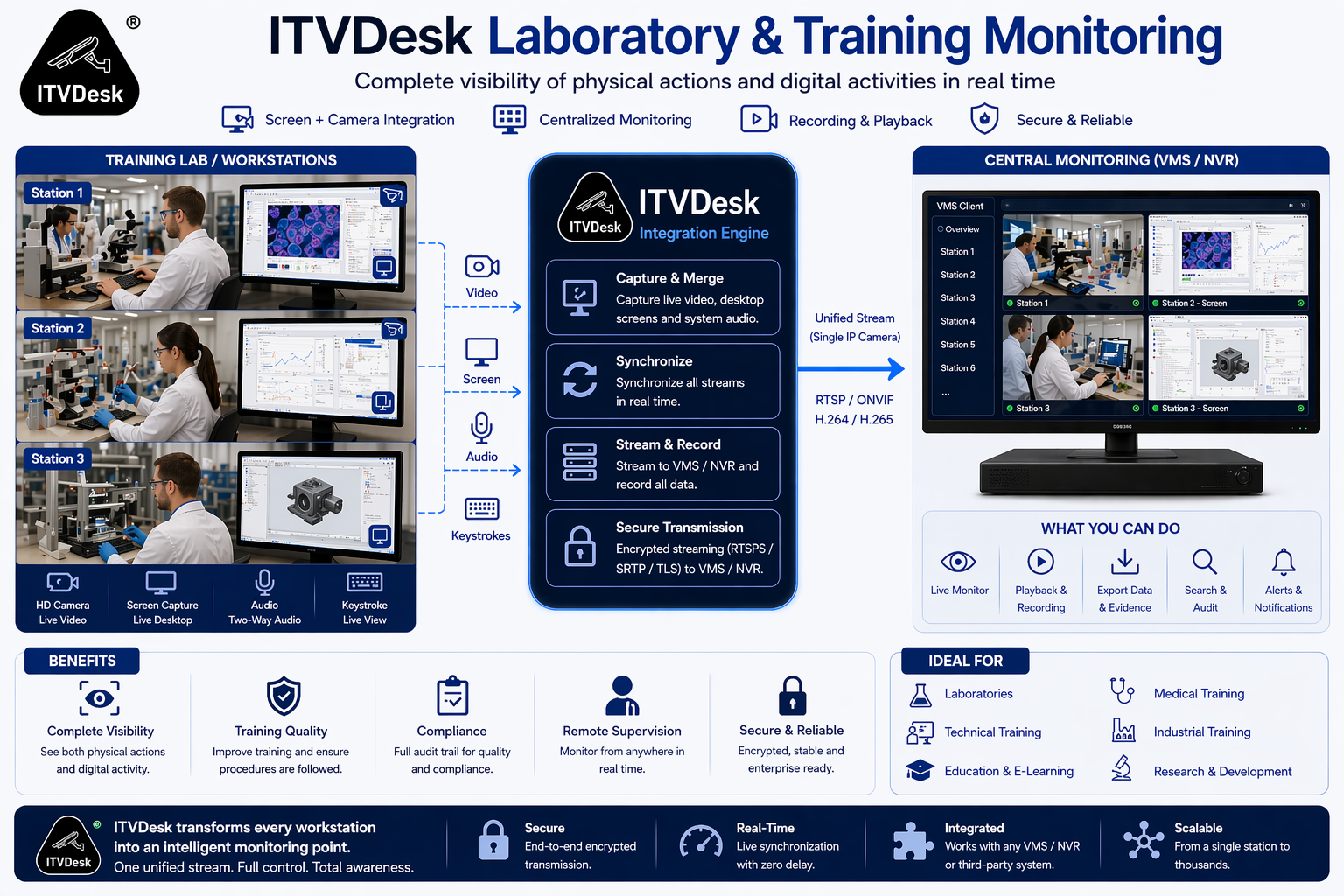
ITVDesk is used in training centers and technical education programs to demonstrate IP camera systems, ONVIF concepts, and VMS operation. It provides a safe and flexible learning environment without the need for physical surveillance hardware.

Research and Prototyping

Research teams use ITVDesk for rapid prototyping of video-based systems, AI video processing, and computer vision pipelines. Virtual video sources allow precise control over test data and repeatable experiments.


Why ITVDesk

ITVDesk bridges the gap between physical video devices and software-based development. By combining virtual IP cameras, NVR/VMS testing, and device simulation into a single platform, it enables faster development, lower costs, and more reliable system validation across multiple industries.

Complete streaming server application

ITVDesk stands out as a comprehensive RTSP (Real Time Streaming Protocol) server application designed for streaming audio and video content in real-time. This fully developed RTSP platform enables users to effortlessly set up and manage content streaming to various clients or devices across a network, making it an ideal solution for organizations and individuals seeking a reliable way to distribute multimedia content for educational materials, corporate presentations, live events, or security surveillance. ITVDesk stands out as a comprehensive RTSP (Real Time Streaming Protocol) server application designed for streaming audio and video content in real-time. This fully developed RTSP platform enables users to effortlessly set up and manage content streaming to various clients or devices across a network, making it an ideal solution for organizations and individuals seeking a reliable way to distribute multimedia content for educational materials, corporate presentations, live events, or security surveillance.

Key features of ITVDesk, making it a complete RTSP server application, include:

Versatile Protocol Support: ITVDesk facilitates RTSP streaming over TCP/IP and UDP, supports RTP multicast for efficient content distribution to multiple recipients, and integrates RTSP over HTTP/HTTPS and WebSocket protocols to ensure flexible and accessible streaming across different network environments.

Comprehensive Format Compatibility: The application supports a variety of video formats like H265, H264, MP4, MJPEG, and audio formats including G711, G722, G726, AAC, OPUS, allowing users to select the most suitable formats for their streaming needs.

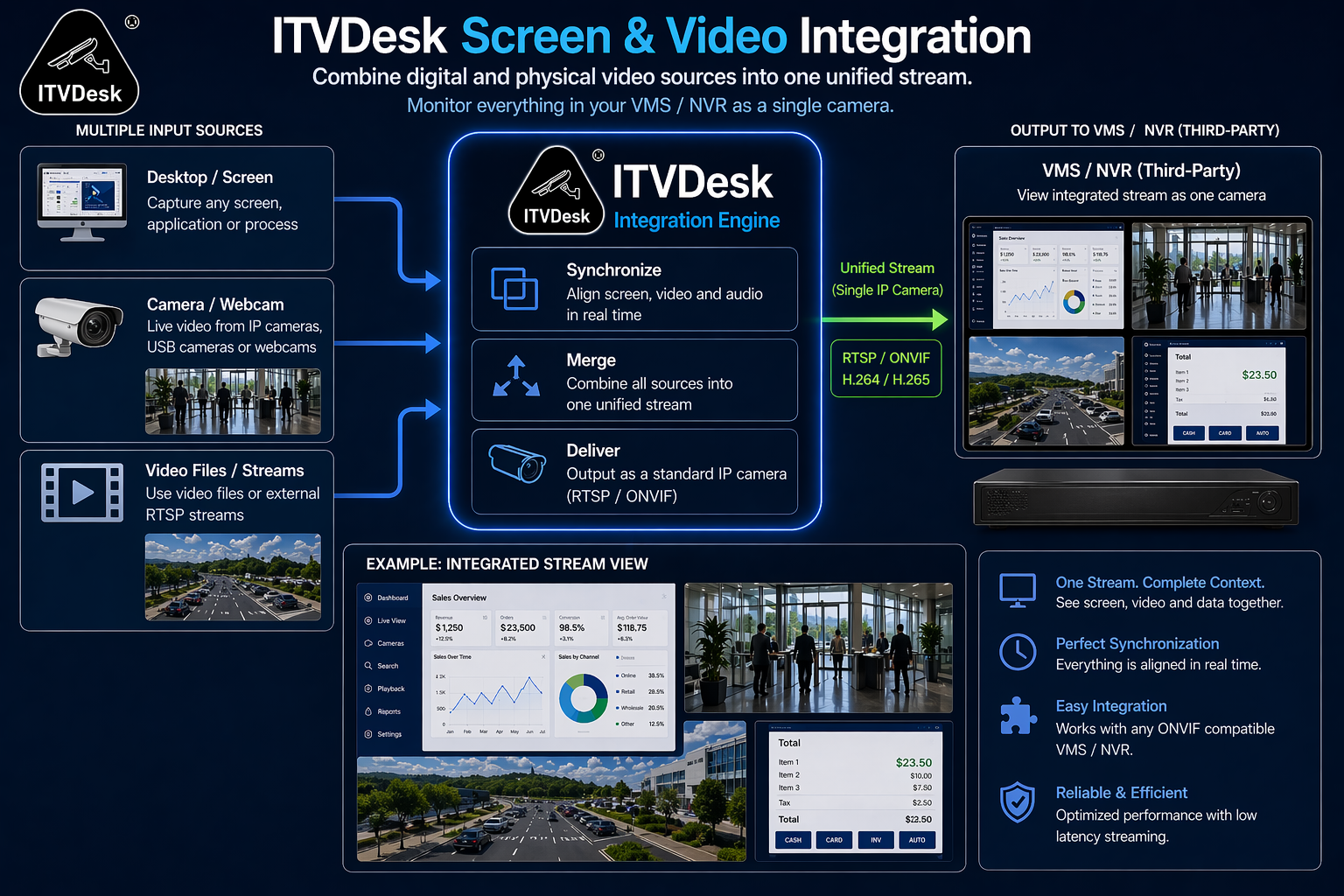
Diverse Streaming Sources: Users can stream content from a multitude of sources, including IP cameras, computer screens, application windows, and audio devices, offering unparalleled versatility for all kinds of presentations and events.

Transcoding and Transmuxing Capabilities: ITVDesk is equipped with powerful transcoding and transmuxing features, enabling the conversion of audio and video streams into different formats and the seamless integration of these streams into various container formats. This ensures compatibility across a wide range of devices and platforms, enhancing the accessibility and quality of streams.

Advanced Configuration Options: The application allows for detailed customization of audio and video output parameters, like resolution, bitrate, and frame rate, affording users precise control over stream quality and performance.
Scalability and Reliability: With its robust architecture, ITVDesk can accommodate the demands of both small and large organizations, offering a stable and dependable platform for content distribution.

Audio Back Channel Support: This feature facilitates two-way communication, proving invaluable for applications that require interactive engagement with the audience or end-users.

ITVDesk emerges as the go-to solution for those seeking a versatile, high-quality application for RTSP streaming, capable of managing diverse content distribution scenarios. Its user-friendly nature, coupled with advanced features such as transcoding and transmuxing, positions it as a prime choice for a broad spectrum of applications, ranging from education and corporate presentations to live events and security surveillance.

🧰 SLA & Support Policy

🧰 ITVDesk SLA & Support Policy

Last updated: October 2025

1. Overview

ITVDesk is developed and maintained by IT – Obrt za informatičke i Internet usluge, focused on providing stable, secure, and reliable software for all users. This Service Level Agreement (SLA) defines the standard level of support and maintenance for licensed ITVDesk customers.

2. Support Channels

Customers can contact technical support via:
📧 This email address is being protected from spambots. You need JavaScript enabled to view it.

Support is available during regular business hours:
🕘 Monday – Friday, 09:00 – 17:00 (CET)
Requests received outside these hours are handled the next business day.

3. Response and Resolution Times

ITVDesk provides support and bug fixing according to issue severity.

PriorityDescriptionResponse TimeEstimated Resolution
Critical Software not working or blocking main operation ≤ 24 hours 3–5 business days
High Major issue but partial functionality remains ≤ 48 hours 5–7 business days
Normal Minor issue or bug, no major impact ≤ 72 hours Fixed in next update
Low Cosmetic issue or feature suggestion ≤ 5 business days Future release

Response time means when we confirm receipt and start investigation.
Resolution time depends on issue complexity and update schedule.

4. Updates and Maintenance

All active licenses include free access to software updates, security patches, and bug fixes. Older versions (over 24 months) may not receive new updates.

5. Customer Responsibilities

  • Use the latest stable version of ITVDesk.
  • Provide clear description, logs, or screenshots when reporting problems.
  • Maintain a valid license and legal use of the product.

6. Limitations

  • Third-party hardware, network, or OS issues.
  • Custom integrations or modifications by the user.
  • Downtime caused by external hosting or cloud providers.

7. Contact

For all technical issues or product questions, please contact:
📧 This email address is being protected from spambots. You need JavaScript enabled to view it.
🌐 www.itvdesk.eu


Summary:
ITVDesk provides direct email-based support with response within 1–3 business days, and issue resolution typically within 3–7 business days, depending on severity. This SLA ensures fair expectations and transparent communication for all customers.

People Counting with ITVDesk AI-Powered Software

ITVDesk Object Counting with Our AI-Powered Software

In the world of modern video surveillance, the ability to accurately and anonymously count objects is invaluable. Our software, leveraging artificial intelligence technology, seamlessly integrates with existing CCTV cameras to provide this functionality with over 98% accuracy (depending on camera positioning and angle of view). Here’s how it works and where it’s used.

person countingHow It Works

Camera Integration:
- Use overhead CCTV or IP cameras to track objects and people's movements.
- Connect your camera to our ITVDesk software, which processes the video feed to detect entries, exits, queues, and waiting times.

Detection and Analysis:
- Our software precisely identifies and counts various objects as they move through the monitored area. Supported objects include:
- **People**
- **Vehicles**: car, bicycle, motorcycle, bus, train, truck, boat, airplane
- **Animals**: cat, dog, bird, horse, sheep, cow, elephant, bear, zebra, giraffe
- **Items**: handbag, suitcase, sports ball, bottle, wine glass, cup, knife, bowl, banana, apple, orange, book, broccoli, carrot, pizza, cake
- It provides key performance indicators (KPIs) such as sales conversion rates, dwell times, crowd density, movement speed, and staff-to-visitor ratios.

Data Transmission:
- The processed data is securely transmitted and can be accessed via web browsers.
- Various communication methods are supported, including the Internet of Things (IoT), Wi-Fi, LAN, or via the ONVIF protocol.

Applications

Retail Stores:
- Track customer entry and exit points to understand peak hours and improve staff allocation.
- Analyze dwell times and sales conversion rates to optimize store layouts and marketing strategies.

Public Transportation Hubs:
- Monitor passenger flow to enhance service scheduling and reduce congestion.
- Provide passengers with real-time occupancy levels via apps, improving their travel experience.

Event Venues:
- Manage crowd control by monitoring queue lengths and waiting times.
- Ensure compliance with safety regulations by tracking occupancy levels.

Offices:
- Optimize space utilization by understanding how different areas are used throughout the day.
- Improve visitor management by tracking and analyzing visitor patterns.

Urban and Traffic Management:
- Monitor and manage traffic flow by tracking vehicles and optimizing traffic light timings.
- Ensure safety by identifying and responding to potential hazards on the roads.

Benefits

Accuracy and Anonymity:
- Achieve over 98% accuracy in object counting while ensuring anonymity, protecting individuals' privacy (depending on camera positioning and angle of view).

Real-Time Insights:
- Access real-time data to make informed decisions and improve operational efficiency.

Enhanced Customer Experience:
- Use insights from dwell times and queue statistics to reduce wait times and improve customer satisfaction.

By using our AI-powered software, businesses and organizations can gain valuable insights into object and foot traffic and optimize their operations for better efficiency and customer service. This innovative solution transforms existing surveillance infrastructure into a powerful tool for data-driven decision-making.

⚙️ Getting Started with ITVDesk

Getting Started with ITVDesk

Welcome to ITVDesk — the easiest way to stream your Windows desktop or webcam directly to your VMS, NVR, or RTSP-compatible system.

🪟 1. Install ITVDesk

Download and install the latest version of ITVDesk from our official website:

Download ITVDesk

🔐 2. Activate Trial License

When you start the app for the first time, click “Get Trial Online” to activate your 15-day free trial. You’ll receive a confirmation email with your license details and a discount coupon.

🎥 3. Start Streaming

1step itvdesk active

2 step itvdesk active.png

3 step itvdesk active.png

4step itvdesk active.png

Once your trial is active, you can start streaming your screen or camera using:

  • RTSP – e.g. rtsp://your_pc_ip:5555/ipc1-stream1/screenlive
  • RTSPS – Secure RTSP (over HTTPS)
  • ONVIF – Compatible with all major VMS/NVR systems and streams player like VLC etc.

🧩 4. Connect to Your VMS or NVR

Open your VMS software (Milestone, Nx Witness, Luxriot, etc.) or NVR and add a new camera using the RTSP or ONVIF URL shown in ITVDesk.
You can use video help 

📘 Need More Help?

Visit our Support Page or contact us at This email address is being protected from spambots. You need JavaScript enabled to view it.

— The ITVDesk Team

Money-back policy


To ensure customer protection our company offers a 14 days money-back guarantee for our downloadable products.

Software products

If you are not satisfied with our products, you have the unconditional right to claim and receive a refund within 14 days after the purchase date. No refund is available after 14 days.

 
Custom development service

If you claim back your money before our developer starts working on the project the full amount will be reimbursed.
If you claim back your money after our developer has started working on the project, the returned funds are determined by the project manager depending on the progress of the project.

 
Procedure

A request for a refund must be submitted via our Contact Form.

Please notice that on receiving back your money you are obligated to remove the software and all related files from your web-server and every data medium; your further use of the software will be regarded as illegal unless you obtain a license again.

We also believe that most of the refunds can be avoided. Please contact our qualified staff and you will get professional assistance in any technical issue you have been faced with while installing/configuring the software. If you are not happy with our products or services for any reason, you are always welcome to send us your feedback and suggestions on how to improve the software or the services we offer. We will do the best we can to ensure you are totally satisfied with our software and customer service.


🧑‍💼 Employee Monitoring & Data Protection

🧑‍💼 Employee Monitoring & Data Protection

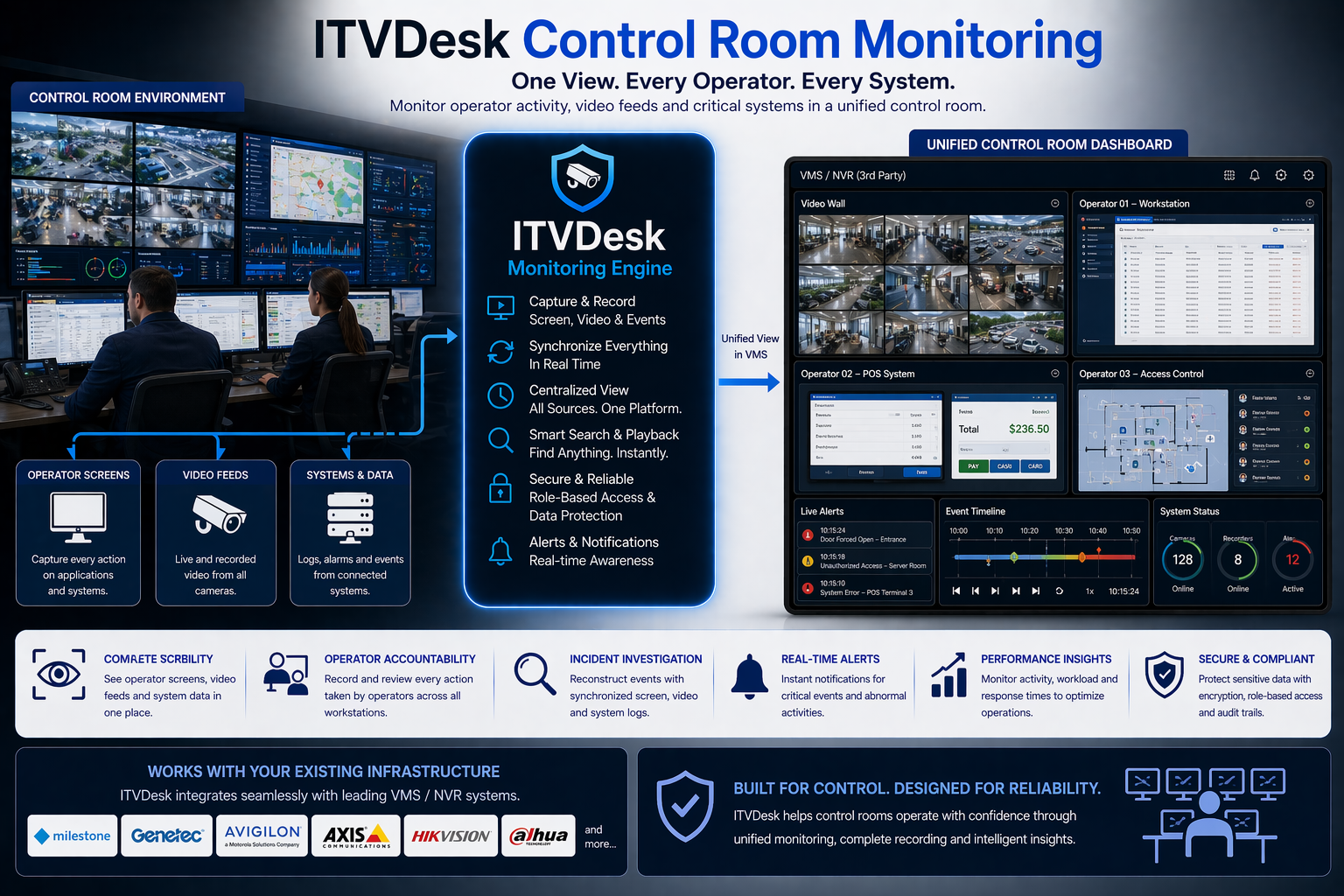
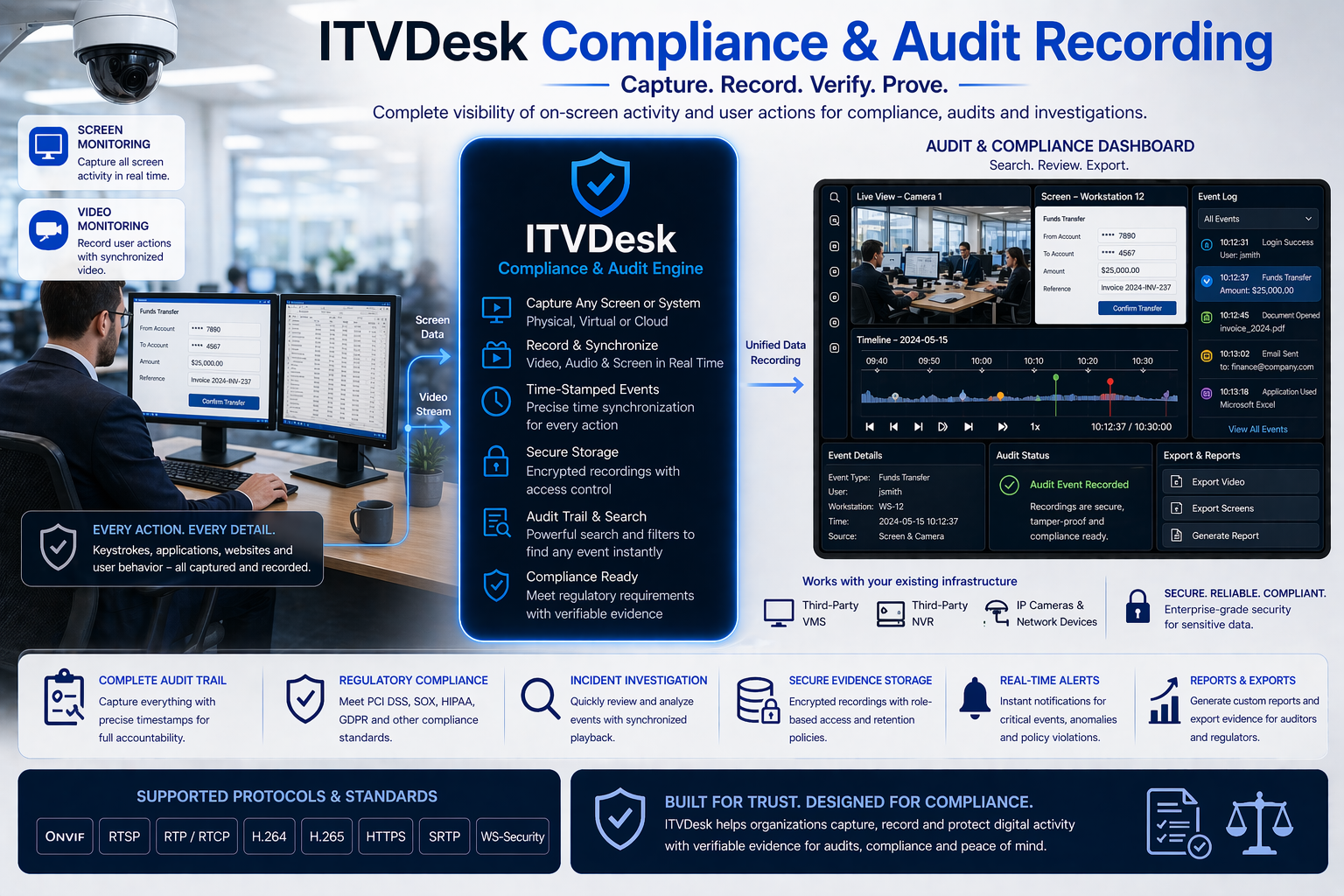
ITVDesk allows companies to maintain full control and data security over their workstations — without relying on external cloud services. It is designed for employee activity monitoring, recording, and sensitive data protection in offices, call centers, and other business environments.

What ITVDesk enables:

  • 📺 Live desktop monitoring of each workstation through secure RTSP/RTSPS streaming
  • 🎥 Activity recording to an NVR or remote server for later review
  • 🔒 Data and screen protection — all video streams are encrypted (TLS/SRTP) and cannot be intercepted
  • 🧠 Local encrypted storage — all camera credentials and configuration data remain within the company network

ITVDesk can be easily integrated with an NVR system or a video management server, allowing managers and IT administrators to review work activities, verify data security, and prevent misuse of confidential information.

Key Security Benefits:

  • ✔ Prevents copying or unauthorized transfer of sensitive data
  • ✔ Enables real-time monitoring and internal auditing
  • ✔ Provides visual records for compliance and incident review
  • ✔ Fully operates inside your private network — no external services required

ITVDesk is the ideal solution for organizations that want to increase productivity, ensure data protection, and maintain full control over their internal IT systems. It uses industry-grade encryption protocols such as RTSPS, SRTP, and ONVIF Security to guarantee safe and reliable operation.