



- Posts: 26
- Thank you received: 1
×
Step-by-step instructions and tips for integrating ITVDesk with different surveillance systems.
Are you experiencing issues with the ONVIF client not detecting devices?
2 years 8 months ago - 2 years 8 months ago #13
by admin
Current firewall guidance for ITVDesk Pro 11.4.2
The ports you need depend on the camera and the transport selected in your VMS or NVR. Use the active values shown in ITVDesk and allow only the ports needed by your recorder.
See the ITVDesk firewall port checklist for the full table and current screenshots.
If Windows reports, check for a port conflict, firewall policy or insufficient permission. Runas an administrator to identify which process is bound to the port before changing any settings.
The ports you need depend on the camera and the transport selected in your VMS or NVR. Use the active values shown in ITVDesk and allow only the ports needed by your recorder.
- ONVIF discovery: UDP 3702 on the local network for automatic discovery. It is not needed just to connect manually by IP.
- ONVIF and HTTP(S) tunnels: Use the camera's configured HTTP or HTTPS TCP port. Use TCP 80 or 443 only if configured. The tunnel carries media on that TCP connection without a separate UDP media range.
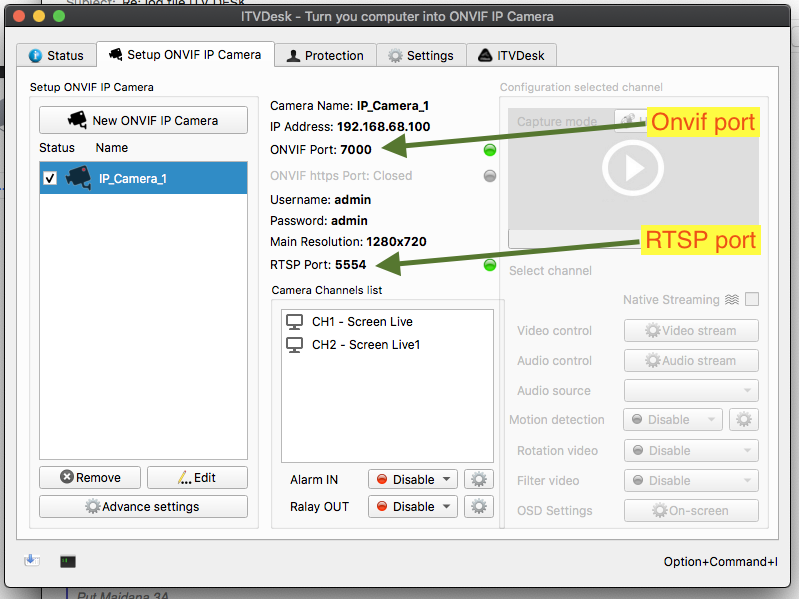
- Direct streaming: TCP 554 is the default RTSP port; TCP 322 is the default RTSPS port when used. Follow the port in the active stream URL.
- UDP media: 22000 is the default ITVDesk RTP/RTCP base port, not a required range. Allow the ports used by ITVDesk and the recorder only when the chosen transport sends media over UDP.
See the ITVDesk firewall port checklist for the full table and current screenshots.
If Windows reports
Bind UDP socket fail, error = WSAE-10013netstat -abno -p UDP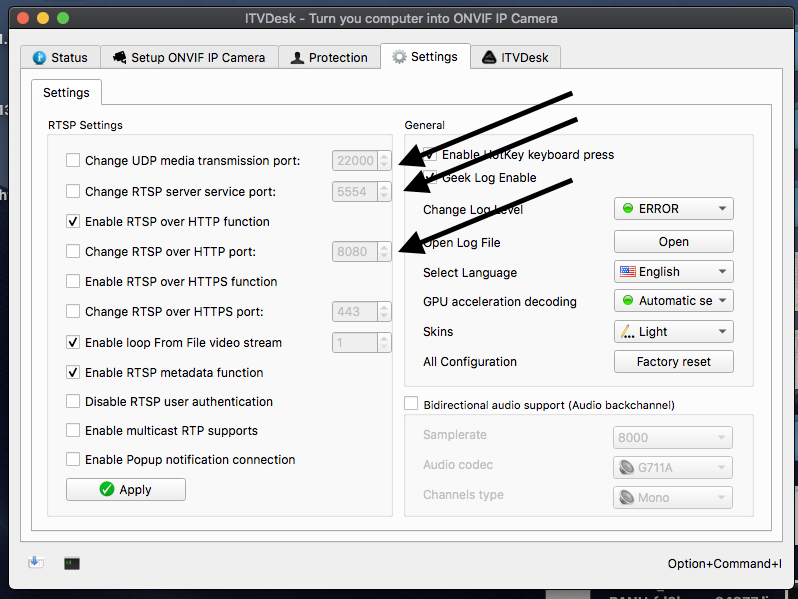
Last edit: 2 years 8 months ago by admin.
Please Masuk or Create an account to join the conversation.
2 years 8 months ago - 2 years 8 months ago #14
by admin
Replied by admin on topic Are you experiencing issues with the ONVIF client not detecting devices?
Are you experiencing issues with the ONVIF client not detecting devices? It's possible that the challenge arises when both the ITVDesk and Onvif client applications are operational on the same machine. This setup often leads to a port conflict, particularly impacting the client's ability to receive the PROBE response packet.To circumvent this issue, we recommend running the client application on a separate computer from where the ITVDesk server is hosted. This adjustment should resolve the detection problem by eliminating the port conflict, allowing smooth communication between the Onvif client (VMS, NVR, XVR...) and ITVDesk IPCamera.
Last edit: 2 years 8 months ago by admin.
Please Masuk or Create an account to join the conversation.

9 months 3 weeks ago - 9 months 3 weeks ago #27
by ozumu
Replied by ozumu on topic Are you experiencing issues with the ONVIF client not detecting devices?
Als uw onvif-client geen apparaten detecteert, kan dit te wijten zijn aan een poortconflict wanneer zowel de itvdesk-als de ONVIF-clienttoepassingen op dezelfde machine worden uitgevoerd. Dit conflict kan de client blokkeren om het PROBE response packet te ontvangen. Om dit op te lossen, probeert u de ONVIF-client op een andere computer uit te voeren dan de computer die de ITVDesk-server host. Deze scheiding moet het poortconflict elimineren en zorgen voor een soepele communicatie tussen de ONVIF-client (zoals VMS, NVR of XVR) en ITVDesk IP-camera ' s. Speel en ontdek de
GoldenPanda casino
bonusmogelijkheden bij Golden Panda Casino.
Last edit: 9 months 3 weeks ago by ozumu.
Please Masuk or Create an account to join the conversation.