ITVDesk 10.1 focuses on more efficient video source handling, expanded browser-based management, and improved reliability for professional ONVIF, RTSP, RTSPS, VMS, and NVR deployments.
Release highlights
- Native Source Output mode helps preserve the original source resolution, frame rate, and stream characteristics where possible.
- Direct no-transcoding output for suitable RTSP/RTSPS sources can help reduce CPU/GPU usage during setup and streaming.
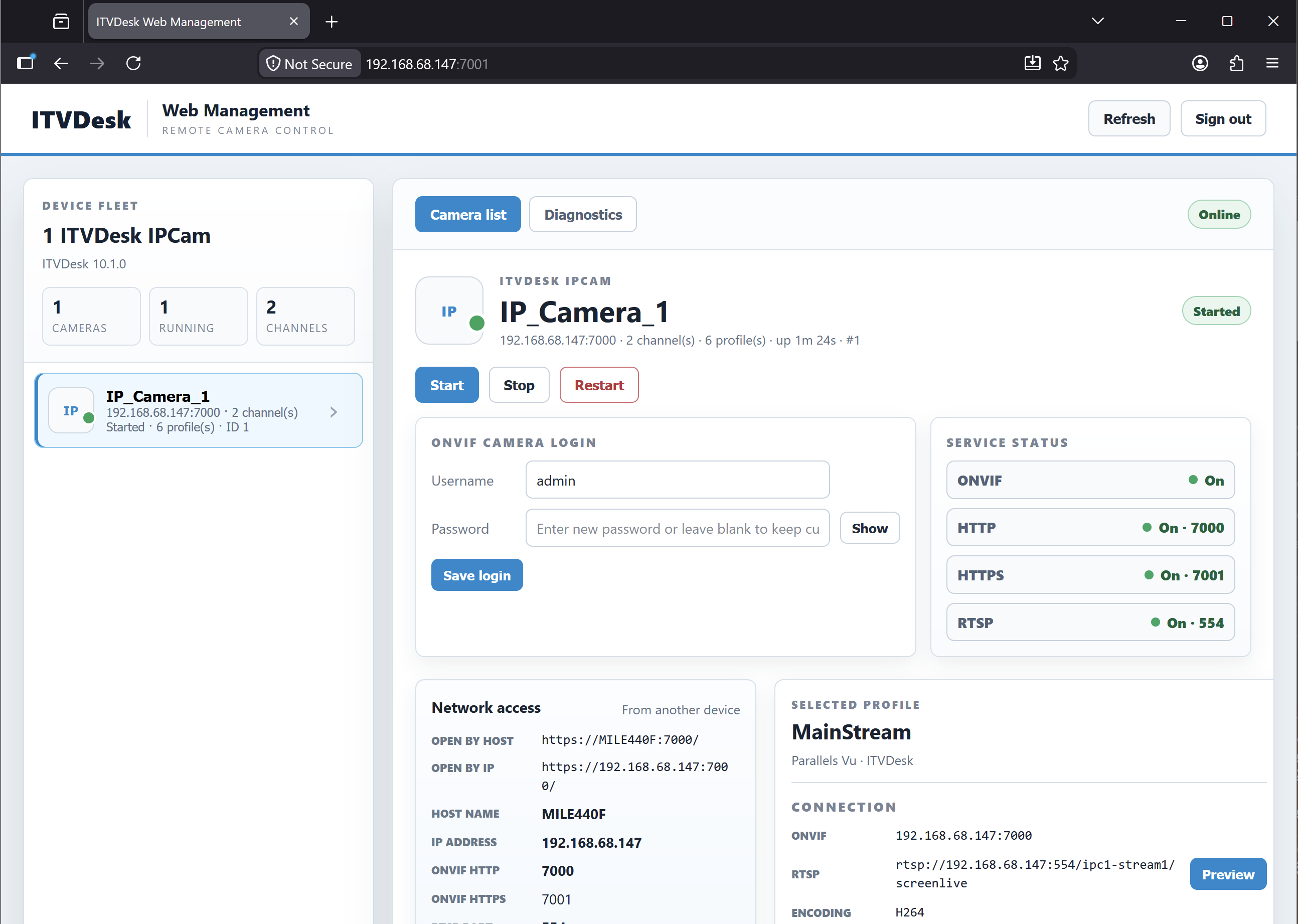
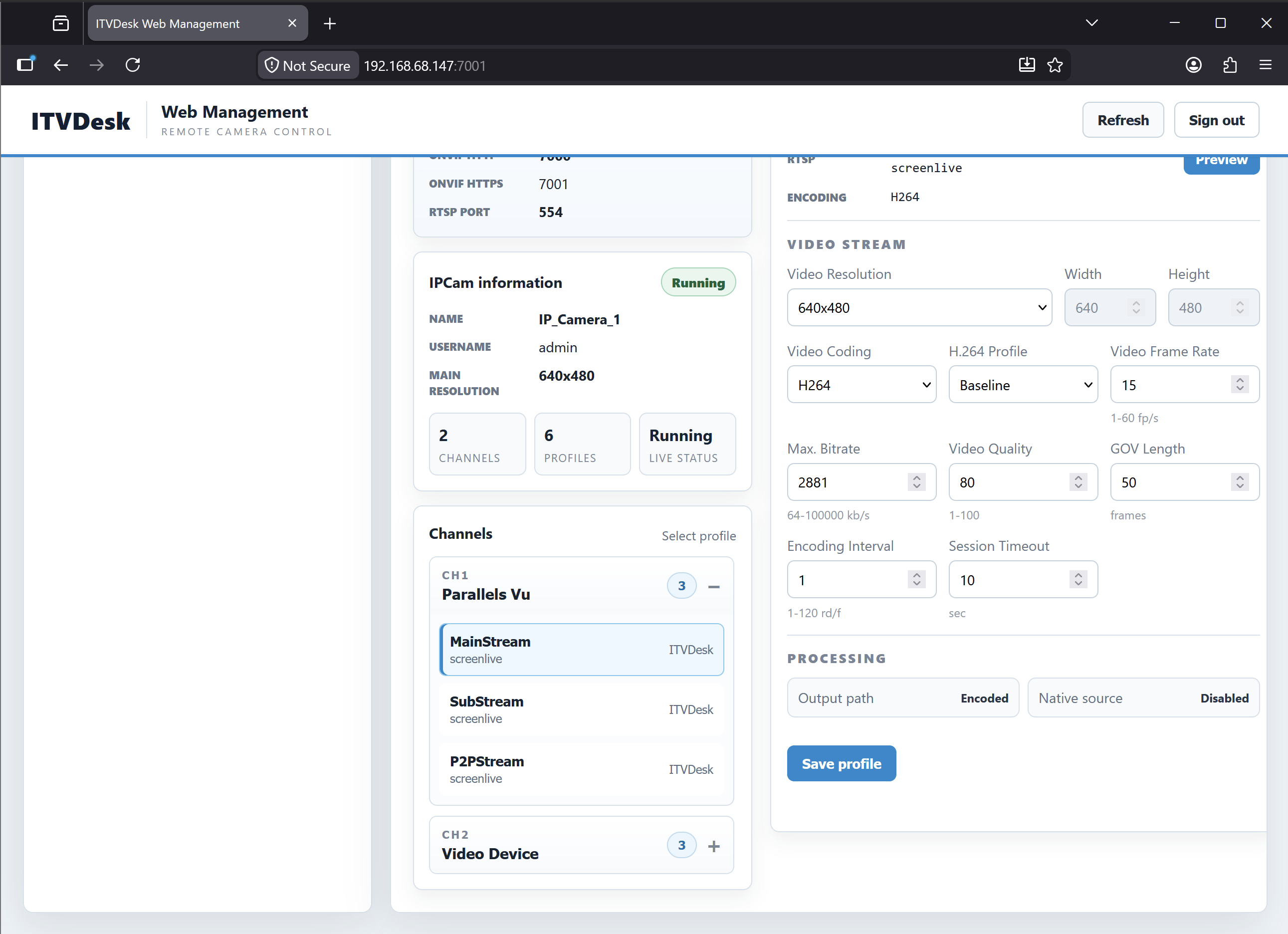
- Expanded ITVDesk Web Management provides clearer camera, channel, and profile overview, start/stop/restart actions, live preview, ONVIF login update, video stream settings, and system status information.
Improvements
- Improved Windows installer upgrade handling when ITVDesk or related helper processes are still running.
- Improved Auto IP handling when the local network address changes, helping ONVIF/RTSP services keep using the correct active IP address.
- Improved desktop monitor handling when Windows reports multiple monitors with the same name, helping ITVDesk keep channel order consistent after add, edit, and restart.
- Improved RTSP audio stream stability during rare start/stop or client reconnect scenarios.
- Improved event and alarm handling stability during rare device state changes.
- Improved update eligibility handling for license deployments.
- Improved enterprise license handling for camera deployments.
- Improved offline license file handling.
- Improved IPCamera channel setup.
- Improved crash report diagnostics with additional support information for faster issue analysis while keeping compatibility with existing clients.
ITVDesk update overview
This ITVDesk update focuses on more efficient video source handling, improved browser-based management, and better reliability for professional VMS/NVR deployments. The main goal is to make ITVDesk easier to manage, more predictable in larger installations, and more efficient when working with external RTSP/RTSPS sources, desktop capture, and multi-channel camera configurations.
Native Source Output mode
ITVDesk now includes a new Native Source Output mode. This option is designed to preserve the original source characteristics where possible, including resolution, frame rate, and stream format. When the selected source is suitable, ITVDesk can reduce unnecessary video processing and provide a more direct output path to the VMS/NVR system.
This is especially useful for external RTSP and RTSPS sources. In supported scenarios, ITVDesk can use a direct no-transcoding output instead of decoding and re-encoding the video stream. This can help reduce CPU and GPU usage, simplify setup, and improve overall streaming efficiency.
For example, when an external IP camera or RTSP encoder already provides a compatible stream, ITVDesk can act more like a virtual ONVIF/RTSP wrapper. The source can be exposed through ITVDesk as part of a managed virtual IP camera configuration, while keeping the original stream characteristics as much as possible.
Why this matters
In many installations, video streams do not always need to be transcoded. Transcoding is useful when the stream must be resized, converted, overlaid, optimized, or normalized for a specific VMS/NVR. However, when the original stream is already suitable, avoiding extra processing can provide several benefits:
- Lower CPU and GPU usage
- Reduced processing delay
- Preserved original stream quality where possible
- More efficient use of ITVDesk in multi-channel deployments
- Simpler integration of existing RTSP/RTSPS sources into VMS/NVR systems
Native Source Output is not intended to replace all processing modes. It is an additional option for sources and deployments where direct stream handling is the better choice.
Expanded ITVDesk Web Management
This update also expands the ITVDesk Web Management interface. The browser management page now provides a clearer overview of cameras, channels, and stream profiles, making it easier to manage ITVDesk from another computer on the same network.
Administrators can now use the web interface to review camera status, manage channels, adjust video stream settings, update ONVIF login credentials, and access live preview for troubleshooting and verification.
What can be managed from the browser
- Camera, channel, and stream profile overview
- Start, stop, and restart actions
- Live preview of active video streams
- ONVIF username and password update
- Video stream settings
- Status information for startup options
- Visible mode configuration
- Desktop monitor notice status
This is useful in managed environments where the ITVDesk computer may not be physically accessible, or where IT administrators need to check stream status without opening the VMS/NVR client.
Improved Auto IP handling
ITVDesk now handles local network address changes more reliably. This helps ONVIF and RTSP services continue using the correct active IP address when the local network changes, the computer reconnects, or Windows temporarily reports another adapter first.
This is important for systems with multiple network adapters, VPN adapters, virtual adapters, Hyper-V, or changing DHCP addresses. The improvement helps reduce cases where the VMS/NVR connects to the wrong interface or where the camera service becomes reachable on an unexpected IP address.
More consistent desktop monitor handling
This update improves how ITVDesk handles desktop monitors when Windows reports multiple displays with the same name. In some multi-monitor systems, Windows can expose similar or duplicated monitor names, which may make channel order harder to preserve after editing, restarting, or adding channels.
ITVDesk now keeps desktop channel ordering more consistent in these situations. This helps installations where each monitor or desktop source is assigned to a specific camera channel in the VMS/NVR.
RTSP audio, events, and alarm stability
Several internal improvements have been made to RTSP audio streaming, event handling, and alarm handling. These changes target rare cases that may occur during stream start/stop, client reconnects, or device state changes.
The result is more predictable behavior when ITVDesk is used in systems that depend on continuous recording, event monitoring, alarm input/output, or audio stream availability.
Improved license and enterprise deployment handling
This update improves license handling for different deployment scenarios, including update eligibility, enterprise camera deployments, and offline license file handling.
These changes are especially relevant for larger installations where ITVDesk may be deployed across multiple computers, isolated networks, or environments where internet access is restricted.
Better IPCamera channel setup
The IPCamera channel editing workflow has also been improved. This helps administrators configure and adjust camera channels more reliably, especially in setups with multiple virtual cameras, multiple channels, or external RTSP/RTSPS sources.
Improved crash report diagnostics
ITVDesk can now include additional support information with crash reports. This helps support analyze rare issues faster while keeping the upload process compatible with existing clients.
The goal is to make troubleshooting easier without requiring users to manually collect many technical details. When a rare issue occurs, the additional diagnostic information can help identify whether the problem is related to source handling, encoding, networking, licensing, or system environment.
Recommended use cases for this update
This update is especially useful for:
- VMS/NVR integrations using external RTSP or RTSPS sources
- Multi-channel ITVDesk deployments
- Systems where lower CPU/GPU usage is important
- Installations with multiple monitors or changing display configurations
- Managed environments where browser-based administration is preferred
- Enterprise or offline license deployments
- Security environments that require stable ONVIF/RTSP camera behavior
Availability
The latest ITVDesk version is available now. Existing users can upgrade to benefit from improved source handling, expanded web management, and better reliability across ONVIF, RTSP, audio, events, alarms, licensing, and enterprise deployment scenarios.